
SWITCHING TO TAXPAD
Moving to Taxpad doesn’t need to be complicated
Whether you’re moving from desktop software or another cloud platform, we’ll help you get started with Taxpad and make the transition as straightforward as possible.
DATA MIGRATION
Bring your client data with you
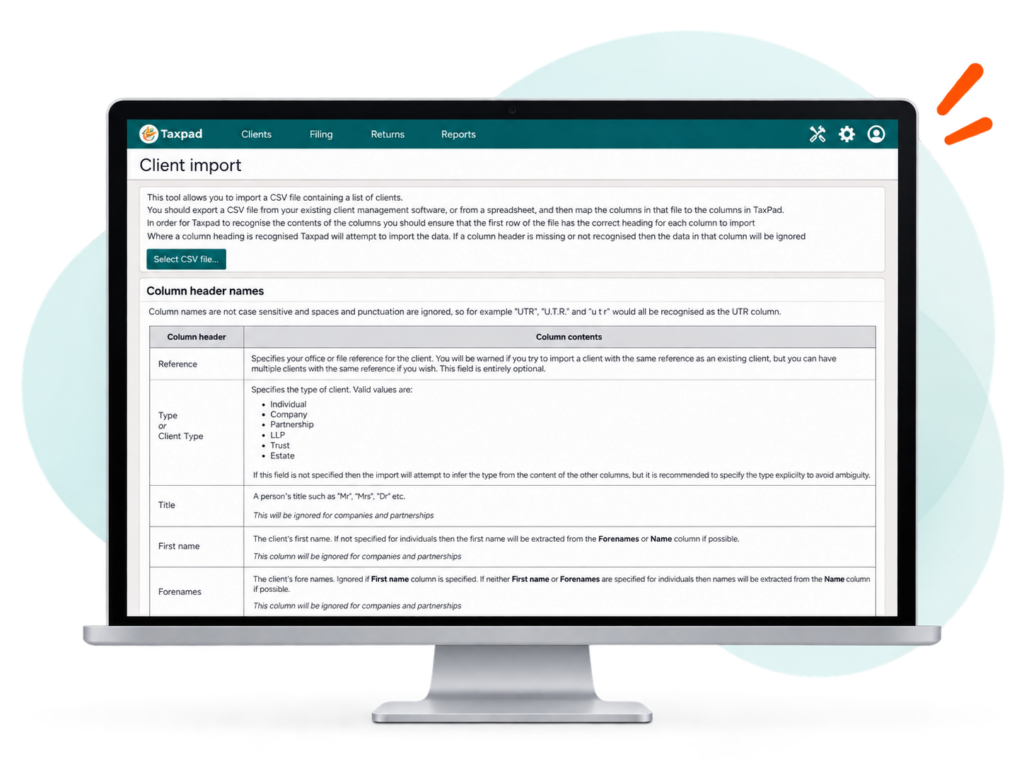
Taxpad allows you to import a CSV file containing a list of clients from your existing client management software or from a spreadsheet, helping you move your client records across without entering everything again.
How it works
Export your client data
Export a CSV file from your existing client management software or prepare one from a spreadsheet.
recognised column headings
Taxpad uses the headings in the first row of your CSV to identify the information being imported. Column names are not case-sensitive, and spaces and punctuation are ignored.
Import into Taxpad
Where a column heading is recognised, Taxpad will attempt to import the data. Missing or unrecognised columns are ignored.
what can be imported
A wide range of client data is supported, including:
- Reference
- Client type
- Title / names
- Gender
- Date of birth
- Date of death
- UTR
- NI number
- Company number
- Incorporation date
- Accounts reference date (ARD)
- Authentication code
- Registered office
- Phone
- Address details
- Company number
- Incorporation date
- Accounts reference date (ARD)
- Authentication code
- Registered office
- Phone
- Address details
- Reference
- Client type
- Title / names
- Gender
- Date of birth
- Date of death
- UTR
- NI number
Need help moving your client data?
Book a demo to see how easy it is to get started or start your free trial today.